4. De novo 3D model generation
Relion-5.0 uses a gradient-driven algorithm to generate a de novo 3D initial model from the 2D particles. As of release 5.0, this algorithm is different from the SGD algorithm in the CryoSPARC program. Provided you have a reasonable distribution of viewing directions, and your data is good enough to yield detailed class averages in 2D classification, this algorithm is likely to yield a suitable, low-resolution model that can subsequently be used for 3D classification or 3D auto-refine.
Select the New Job tab and find the RELION initial model generation job under the in Initial Model Generation category.
Use the following parameters to run a new initial model creation job. Parameters that are not specified can be left with the default value.
Input images STAR file:: Select/job013/particles.star
NOTE: Input the particles selection Node from the 2D classification selection task.

Number of VDAM mini-batches:: 100
NOTE: The algorithm will loop over mini-batches, which contain only hundreds to thousands of particles.

Number of classes:: 1
NOTE: Sometimes, using more than one class may help in providing a ‘sink’ for suboptimal particles that may still exist in the data set. In this case, which is quite homogeneous, a single class should work just fine.

Symmetry:: D2

Run in C1 and apply symmetry later?:: Yes
NOTE: The actual refinement will be run in C1, which has been observed to converge better than performing it in higher symmetry groups. After the refinement, the relion_align_symmetry program is run to automatically detect the symmetry axes and the symmetry will be applied.

Mask diameter (A):: 200

Flatten and enforce non-negative solvent:: Yes

Initial angular sampling: 15 degrees
NOTE: The default angular and offset samplings should be fine for most cases, perhaps except for highly symmetric particles like viruses, which may require finer samplings.

Offset search range (pix):: 6

Offset search step (pix):: 2

HEADER: Compute Options

Use parallel disc I/O?:: Yes

Number of pooled particles:: 30

Skip padding?:: Yes

Skip gridding?:: Yes

Pre-read all particles into RAM?:: No
NOTE: For small datasets / computers with large RAM allocation this can be faster however we will write the particles to a scratch disk instead, see below.

Copy particles to scratch directory:: <leave blank>
NOTE: N.B. This can be useful if you don’t have enough RAM.

Combine iterations through disc?:: Yes

Use GPU acceleration?:: Yes

Which GPUs to use:: <leave blank>

HEADER: Running Options

Number of threads:: 10
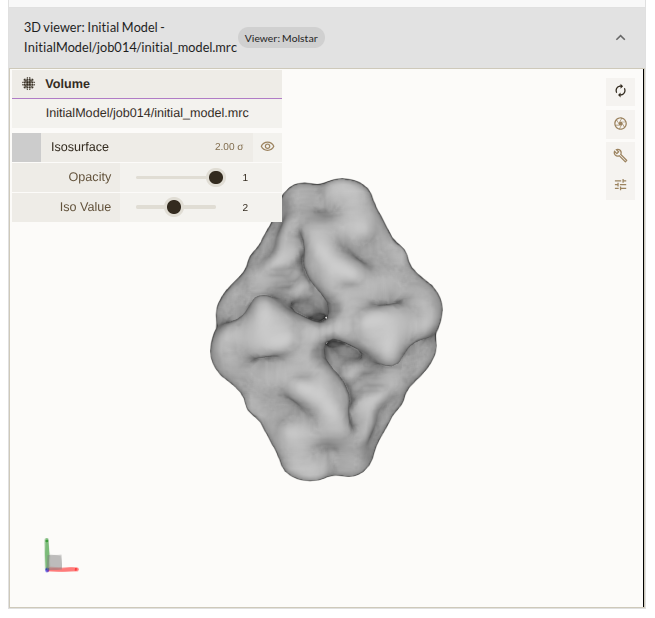
Click RUN to start the job. Using the settings above, this job took ~7 minutes on our system. When the job is complete you can visualise the output map from the RESULTS tab in the Doppio interface by clicking on the Initial model panel for initial_model.mrc. This map should have been symmetrised. Visually confirm that the map has the expected shape and symmetry. The resolution of the map will be low, but the general shape should be correct.
If you’re having trouble viewing the model in Mol*, check out these solutions.