
 CCP-EM Tutorials
1. Fetch an AlphaFold model#
Click the NEW JOB tab and search for the Fetch from AlphaFold DB job from the Fetch section (or use the search field at the top and search for e.g. “alphafold” to find the job). We can get the appropriate model for Escherichia coli (strain K12) beta-galactosidase. Enter the following:
JOB: Fetch from AlphaFold DB
Job alias:: P00722
NOTE: The alias is optional but gives a convenient way to see what each job was at a glance when looking at the list of jobs. If you forget when starting a job, you can set the alias later by clicking on the “three dots” menu next to the job.
UNIPROT accession number:: P00722
DEFAULT: Download format:: mmCIF
Also get FASTA sequence file?:: Yes

HEADER: Processing options
DEFAULT: Process predicted model?:: No
DISABLED: Remove low confidence residues:: Yes
DISABLED: Split model by compact regions:: Yes
DISABLED: Maximum domains to obtain:: 3
DISABLED: Domain size (Å):: 70.0

HEADER: Queue submission options
DEFAULT: Submit to queue?:: No
DISABLED: Queue name:: openmpi
DISABLED: Queue submit command:: qsub
DISABLED: Standard submission script::
DISABLED: Minimum dedicated cores per node::
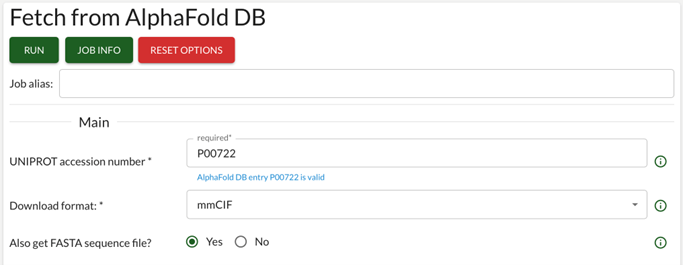
Click RUN to start the job. You can follow the progress in the LOGS tab and when complete you can look at the model in the RESULTS tab.
